How WorkMagic's Conversion API enriches your signals and improves ad performance

by
Iris Zhu, Product Manager
What is a Conversions API?
A Conversions API (CAPI for short) lets you send conversions to an ad platform from a server instead of from the shopper’s browser. Ad networks like Meta and Google have opened up CAPIs in order to backfill conversion signals that their pixels were missing due to tightening privacy regulations and cookie degradation.
Of course, it's much more than just sending your ad partners conversion data, which they heavily rely on to optimize your ads and improve delivery and targeting.
The tricky part is that an ad platform can only optimize against events it can tie to a real person, so a signal without identity doesn't improve much. WorkMagic's CAPI sends every web order with the buyer’s full identity attached to each one.
Here is how that works, and what it looks like once it is running.
Why Ad Platforms Accept Server-Side Conversion Data
Every major ad platform accepts conversions directly from a third-party server (like your own store, or a measurement partner like us) rather than from the shopper’s browser. The mechanics are simple: instead of trusting a script to fire in a browser you do not control, you send the conversion from infrastructure you do.
Two things are worth clearing up before going further, because both come up in nearly every conversation we have about this:
▸ It does not replace your pixel. It runs alongside it. Both can send the same conversion event, and those conversion events have their own event ID, which the platform uses to deduplicate on arrival.
▸ It does not inflate your numbers. Because of that deduplication, a conversion the pixel already caught is not counted twice. CAPI integrations exist to backfill events that the pixel misses, which is happening more often as more users opt-into privacy settings and tools that block cookies and other tracking.
Where your conversion data goes missing
Across WorkMagic accounts, a browser pixel reports roughly 60% of web orders on average. The other 40% were paid for and shipped, but the platform never heard about them.
This is the part most teams underestimate, because nothing looks broken. A browser pixel only reports a purchase if its script runs successfully, in that browser, at that moment, with the cookies it needs still intact. Four ordinary things break that chain:
Ad blockers and tracking-blocking extensions stop the script from running at all.
Safari and iOS tracking prevention caps how long first-party cookies survive, so a returning shopper looks like a stranger.
The shopper closes the tab the moment the payment clears, before the purchase event has fired.
They saw the ad on a phone and bought on a laptop, and the two sessions are never connected.
This skews your reporting in ways you'd never suspect: Your reporting understates what the channel actually drove, so you under-invest in something that is working. More expensively, the optimization algorithm is learning from a biased sample of your buyers - the ones it happens to be able to see - instead of optimizing towards what your full audience should look like.
How WorkMagic sends the full picture
Closing that gap takes two things, and most setups only do the first. You need every order to reach the platform, and you need the platform to be able to recognize who each one belongs to.
More data: start from the order, not the browser
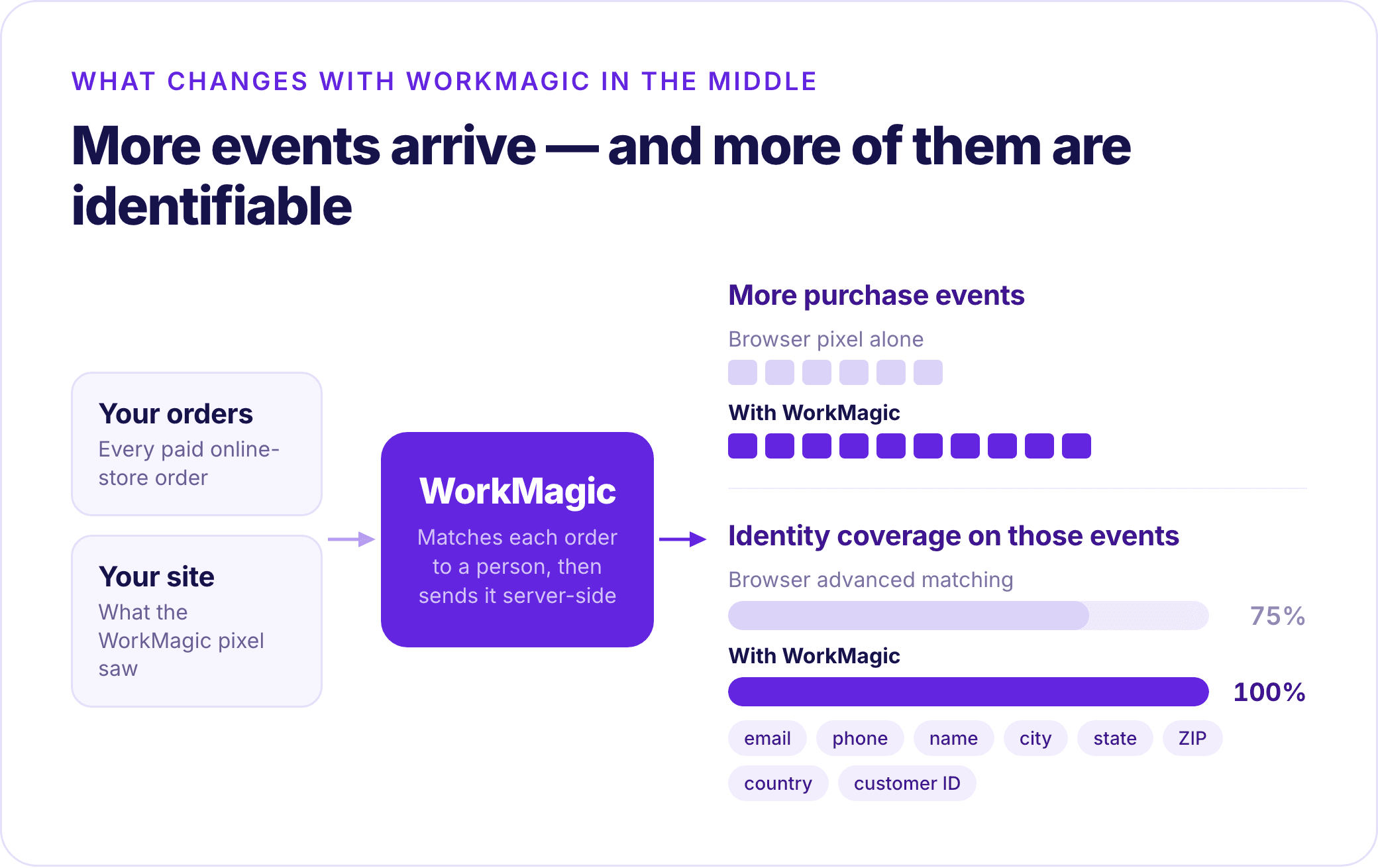
WorkMagic already holds every order you take, so a conversion event can start from the order instead of the browser. We join it against what our own pixel saw on your site: if the pixel fired, we add the identity it was missing; if it doesn't, we send the order anyway. That second group is what no browser-based setup can report.
Two things people ask straight away:
▸ Does this conflict with my existing tracking pixels?
No, both events carry the same event_id, so the platform collapses them into one.
▸ Does this include every single order made?
No, marketplace, point-of-sale, subscription renewal and manual back-office orders are not sent. If there isn't a browsing event to match to the order, the platform can't match that order to an ad. Sending these orders would only muddy the waters and affect your match quality, which we cover below.
Better data: Event Match Quality is the metric that tracks if this works
Platforms score every event type on how reliably they can tie it to a real person. Each platform makes its own decision on whether to surface those scores on their ads manager, and each platform might call it something different.
On Meta, that score is Event Match Quality, from 0 to 10, visible per event in Events Manager. An event nobody can match is an event the algorithm ignores. You can double your event volume and affect nothing if Meta can't see who those events are tied to.
While other networks might call their metric different things or calculate scoring in a different way, the basics are the same - each network tracks how well they can match your conversion events with their identity graphs.

The difference starts with where the identity comes from. A browser pixel only has the info a user types into a page and whatever info the cookies can track.
What we do is pull from the customer profile and the order’s shipping address: email, phone, first and last name, city, state, postal code, country and customer ID from your site's order data, then add the browser-side identifiers to help platforms match ads to events.
The most important part: everything is hashed before it leaves us so we stay compliant with all major privacy regulations.
Match quality is usually computed from the coverage and formatting of exactly these fields, so complete and correctly normalized beats partial every time.
One field gets special handling. Meta’s click identifier (which some ad ops specialists might recognize as _fbc) is normally read from the cookie at the moment of purchase.
However, if shoppers click an ad and buy days later, the browser has most likely cleared it. We solve for this by going back to the ad click that the order is attributed to and use the identifier captured when that click landed. From that change alone, we see double the click-ID coverage on purchase events.
Upper-funnel events get the same treatment in reverse. When a browser fires a page view, a product view or an add-to-cart, the shopper is not logged in and hasn't typed anything, so those events carry no identity at all because the pixel has nothing to fire.
Once that same browser later places an order, we can go back and attach the buyer’s hashed identity to everything it did earlier in the funnel. The key difference is that we use the order only to recognize the person; the order itself is never attached to those events.
That's how we maintain data fidelity and ensure Meta (and all of our partner networks) know what your shoppers are doing and how to weigh those signals against their own algorithms.
The result: on every account sending purchase events through WorkMagic, Meta scores them between 8.8 and 9.3, which is well above the 8.5 line it treats as great. That score helps show how much the algorithm can actually learn from what you send.
What it looks like on a real account
One brand, a fast-growing nutrition company, turned on signal enrichment for Meta and changed nothing else: same campaigns, same creative, same budget. This is their Purchase event in Meta’s own Events Manager, four weeks in:

+166.6% additional purchase conversions reported from the CAPI, against what the browser pixel managed on its own — across 31.9K events.
Event match quality of 9.1 out of 10, comfortably past the 8.5 Meta treats as great, while their own browser advanced matching was only reaching 75% of purchase events.
You want both halves of the equation here: “Additional conversions reported” is Meta’s own measure of volume, or how much more the server reported than the browser could. "Match quality" is the identity half. In other words, you want to capture as many conversion events as you can, and you want to be able to match as many of those events to people that your ad platforms recognize.
Without CAPI integrations like WorkMagic's, what usually happens is the former but not the latter, which results a flood of events the platform cannot match to anyone. Without that identity half, you're just sending data your ad partners can't do anything with.
How to tell it is working
You do not need a lift test to confirm the plumbing works. Three things are visible in Events Manager on their own schedule:
Within 24 to 72 hours: server events start appearing, and you can confirm delivery.
Within 1 to 2 weeks: event match quality rises, and reported conversion volume increases as the platform matches events it had been losing.
Over several weeks: delivery and targeting shift as the algorithm learns from the richer signal.
Where to start
If you are already a WorkMagic customer, it just takes a few clicks on our Settings page:
Connect your ad account
Choose the events you want sent
The CAPI runs daily from there. There is no tag manager work and no engineering ticket.
Almost every measurement vendor has some version of CAPI, so if you're evaluating between platforms, the question to ask is not whether they support a CAPI. Ask what data they start from, what identity they can attach to each event, and what they refuse to send. That is where the difference actually lives.
A good first check: open Events Manager, look at your purchase event, and read two things — your event match quality score, and your advanced matching coverage. If the score is below 8.5 or coverage is well under 100%, there is room on the table before you change a single campaign.