How to actually use AI for marketing analysis: a practical guide for marketers

by
Iris Zhu, Product Manager - AI Tools
You don’t need to be a “prompt engineer” to get real value out of AI. You mostly need to stop treating it like a search bar. This guide shows you how to put a marketing analyst on your team that remembers your numbers, works 24/7, and answers in plain English. There are two ways to get there: connect your own AI accounts to WorkMagic, or let our agent Justin handle it for you.
Why this matters for marketers
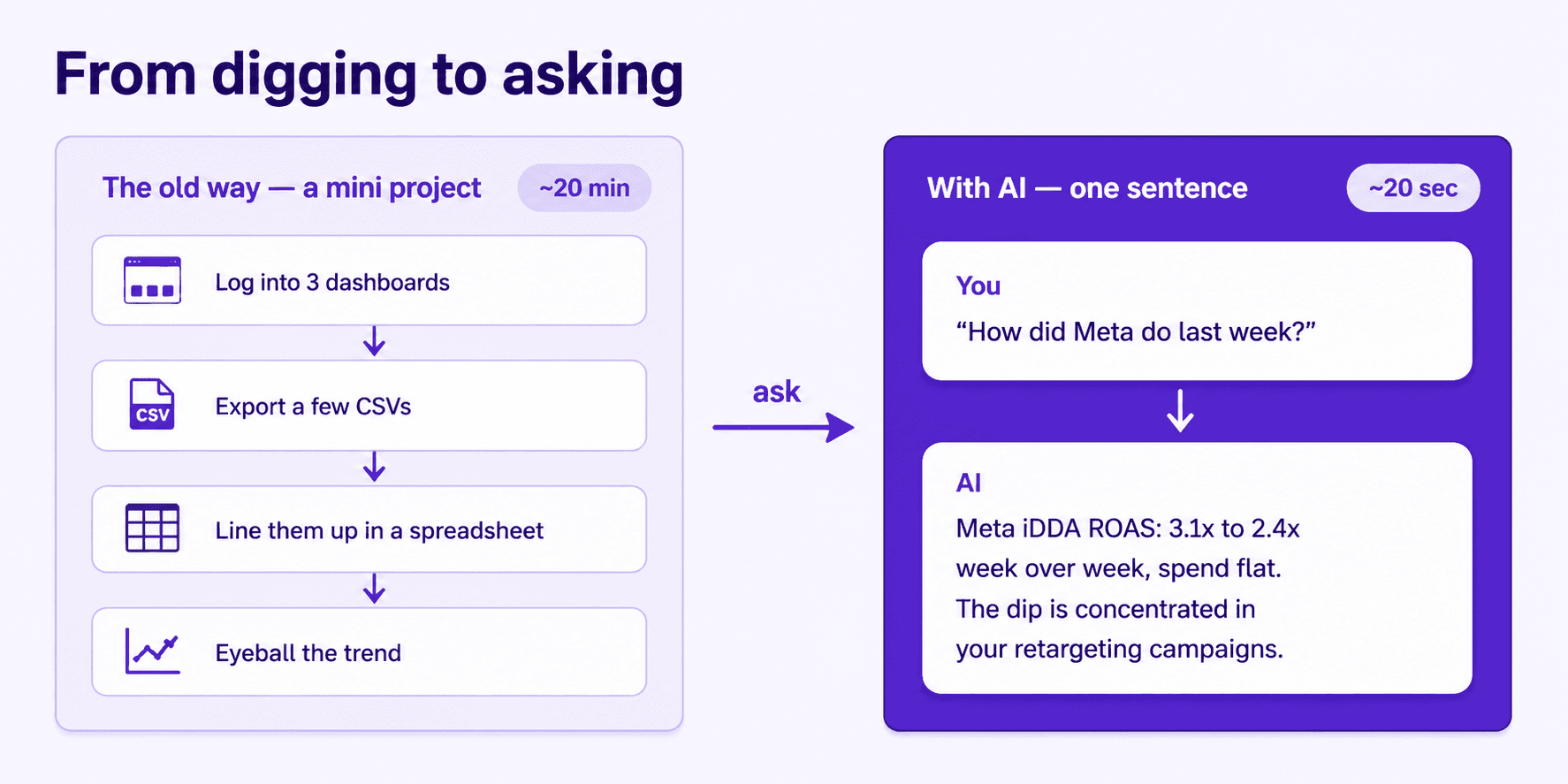
Right now, answering a simple question is a project on its own. You log into three dashboards, export a couple of CSVs, line them up in a spreadsheet, and squint at the trend. It works, but it also eats up your entire afternoon and sometimes the question is no longer relevant by the time you get an answer.
We all know by now that AI is capable of saving you the spreadsheet shuffle and giving you a clean, manicured report in a matter of minutes. But here's the catch: a generic chatbot will hand you a confident answer built on faulty numbers. Untrained LLMs are great at SQL, but they're not so great at detecting anomalies and fixing numbers that your eyes catch immediately.
So how do we make AI trustworthy enough to actually use? You have to connect it to your real, incrementality-calibrated data, so the answer reflects what actually drove sales rather than what each ad platform wants credit for.
Two ways to put AI to work on your data

Path 1: Bring your own LLM + WorkMagic MCP
If you're already using Claude or ChatGPT on a constant basis, you can wire it up to your WorkMagic data yourself and ask questions right where you’re already working. This is the DIY route, and it suits a hands-on marketer who doesn’t mind a little setup.
How to set it up:
In WorkMagic, open your MCP connection settings and copy the MCP URL and API key.
In your AI tool, add WorkMagic as an MCP connector and paste them in.
Start asking. “What was my Meta iDDA ROAS last week?” now reads straight from your WorkMagic data.
Good to know: Remember that your AI tools are tied to your account, so any conversation you have with it can't be shared with other teammates. Connecting to our MCP is great for 1-to-1 analysis or quick questions, but for collaborative work you'll want to use a pre-designed agent like our very own Justin AI.
Path 2: Justin AI, done for you in Slack
Justin is a marketing analyst that lives in your Slack, running on the same WorkMagic data with the setup already handled. Nothing to connect, nothing to maintain. You link the tools you already use (WorkMagic, Google Ads, Google Docs, Zoom), then ask the way you’d ask a sharp colleague: “How did Meta do last week?”, “Why is my CAC climbing?”, “Build me a dashboard I can send my CMO.”
Justin also does the things a real teammate does. It remembers your business, including your break-even ROAS and which attribution model you actually trust. It works across every tool you’ve connected. And it comes to you: the Monday brief, the anomaly alert, and the month-end recap all land without anyone asking for them.
Which should I use?
Take Path 1 if you’re technical, live inside an AI tool already, and want to own the setup.
Take Path 2 if you want the whole team to have an analyst without anyone configuring anything, with shared memory and alerts that come to you. Most teams land on Justin. Either way, both read from the same source of truth, so the numbers agree.
How it works (so it feels less like magic)
A lot of people hesitate here because they can’t see what’s happening under the hood. Here’s the entire loop. It’s shorter than you’d expect:

Three mindset shifts if you're new to this
The gap between people who get a lot out of AI and people who get a little isn't technical skill — it's how they treat it. Three shifts do most of the work, and they apply no matter which path you're on.
The people who get the most out of AI aren’t the most technical ones. They just treat it differently. Three habits do most of the work, and they apply on either path.
1. Treat it like an analyst, not a search box
A search box wants one perfect query. An analyst wants a conversation. So don’t sit there engineering the ideal prompt. “How’s paid doing this week?” is a fine opener. Say that, see what comes back, and react to it.
2. Keep talking instead of handing off a task
This is the habit that separates power users from everyone else: they keep asking. They don’t request last week’s numbers and walk away. They push. “Why did Google drop?” “Is that a real change or a tracking issue?” “What would you do about it?” Follow-ups cost you nothing, and the second or third question is usually where the useful part shows up.
3. Be specific about the goal
Fancy wording won’t help you. Three details will: which metric, what timeframe, what scope. “How’s Meta doing?” is vague. “Meta iDDA ROAS, last 30 days, Shopify only” is sharp. Same amount of typing, much better answer.
What it looks like day to day: three use cases
A lot of our customers have already used our MCP or Justin AI to get things moving quicker within their own teams.
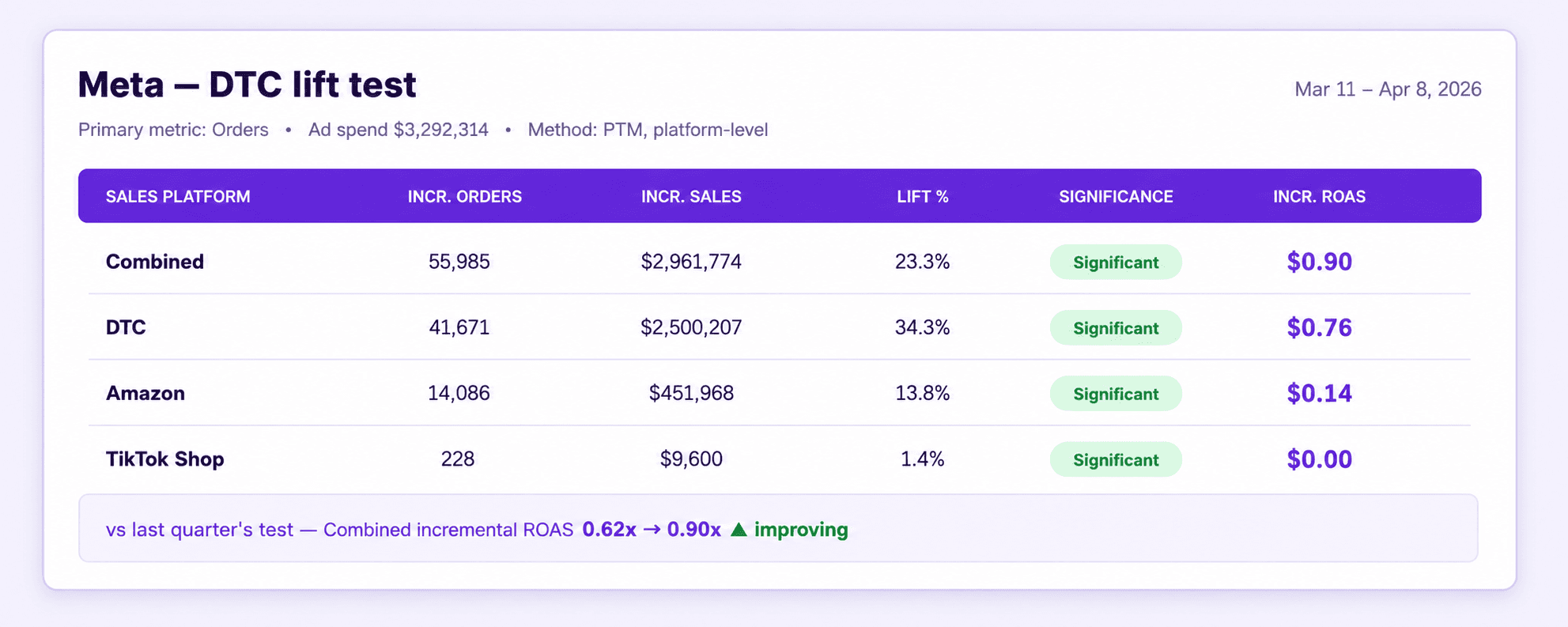
1. Summarize & compare lift test results
You’ve run a geo lift test, maybe two, and you need to know what they actually proved without decoding confidence intervals yourself.
You ask: “Summarize my latest Meta lift test, and compare it to the one we ran last quarter.”
You get: a plain-language readout covering the incremental ROAS, whether the result holds up, and a side by side of both tests showing what changed and what to do about it. A stats output becomes a decision in one message.
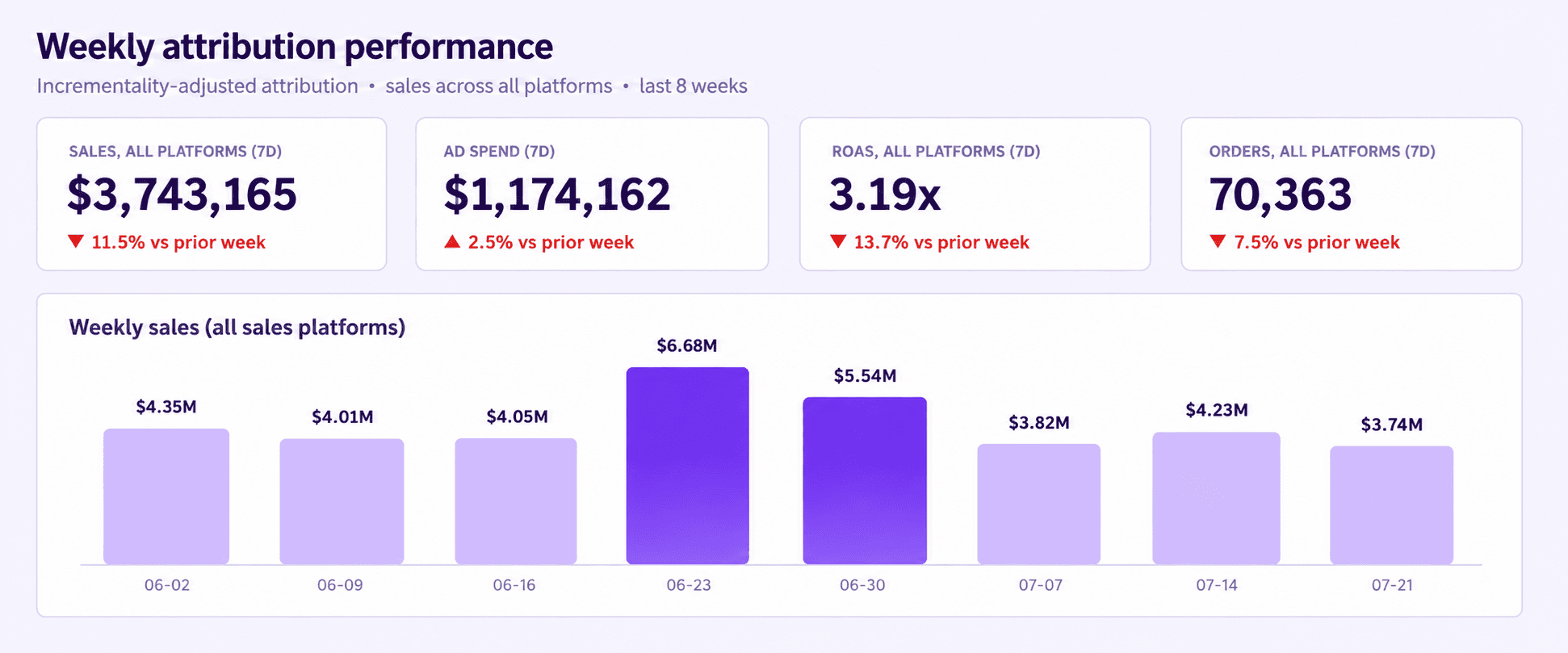
2. Your weekly attribution report
Every Monday you rebuild the same paid performance recap. Of everything here, hand this one off first.
You ask: “Give me last week’s paid performance under iDDA: ROAS and CAC by channel, week over week, and flag anything off.”
You get: a clean recap by channel with week-over-week deltas, the movers flagged, and a version you can paste straight into your growth channel. Better still, ask once and it runs every Monday on its own, so the recap is waiting for you.
3. Deep-dive an attribution anomaly
A number looks wrong. A channel’s ROAS cratered, or attribution dropped to zero overnight. Instead of opening an investigation, you interrogate it. Notice this is a back and forth rather than one big prompt:
You: How did Meta perform last week vs the week before?
AI: Meta iDDA ROAS fell from 3.1x to 2.4x week-over-week; spend was flat.
You: Is that a real drop or a tracking issue?
AI: Real. Attributed orders fell proportionally, and there’s no UTM break. The dip is concentrated in your retargeting campaigns.
You: Which campaigns specifically, and how much did each lose?
AI: [pulls the three retargeting campaigns with the biggest drop]
You: Build me a one-paragraph summary I can drop in our growth channel.
AI: [writes it, ready to paste]
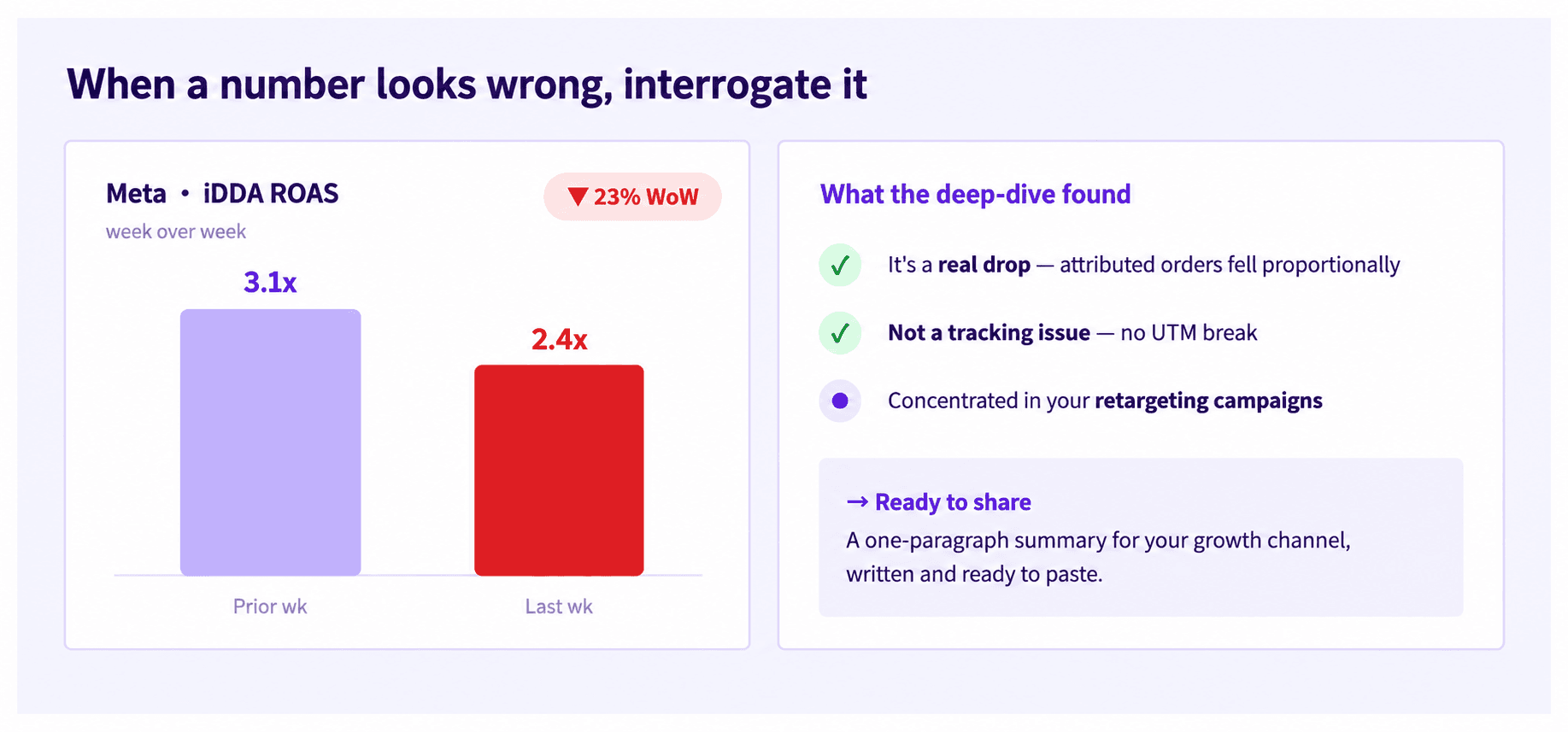
Four sentences took you from "something feels off" to a diagnosed cause and a shareable write-up.
One habit across all three: AI is a strong analyst, not an oracle. When the call really matters, ask which attribution model the number came from, or ask it to show its work. Treat it like a sharp teammate whose output you’d still sanity-check, and it’ll earn your trust quickly.
Get more out of it as a team
A few habits multiply what you get out of this, especially with Justin, where the whole team shares one analyst:
▸ Make shared data public so anyone can query it. Nobody needs to reconnect their own accounts.
▸ Use it in channels, not only DMs. In a channel it picks up the conversation your team is already having, so it understands what you’re actually after, and everyone sees the answer. If you’d pull a data analyst into the thread, pull in Justin.
▸ Turn on the routines. A Monday brief, anomaly alerts, a month-end recap: let the important things find you instead of the other way around.
Start with one question
You don’t have to be “good at AI.” If you can explain what you want to a colleague, you can do this. Pick one question you’d normally spend twenty minutes answering, ask it in plain language, and follow the thread from there. That’s the whole skill, and you already have it.
Try this first: “Give me an overview of last week’s paid performance, and flag anything that looks off.” See what comes back, then follow the thread.